What's new
TackNote Lite release notes
Every version of TackNote Lite for Chrome, and what changed.
1.0.5
October 16, 2026Latest- Make a note your size. Drag a note's bottom-right corner to make it wider. In Settings, choose small, medium or large text for every note.
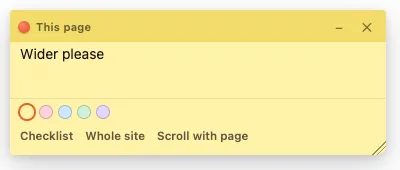
Drag the corner to make a note wider. - Scroll with the page. A note can now stick to its spot in the page and scroll with it. Choose Stay on screen to keep it where you put it on screen.
- All versions of this page. A note can stay on a page even when its address picks up options, such as a colour or size on a product page. Choose All versions on the note.
- Every site, or one at a time. You can let TackNote Lite work on every site with one question, from the welcome page or the settings. Or keep allowing one site at a time.
- Notes that are waiting. If a page has notes but the site isn't allowed yet, the board says so and brings them back with one click. Once you have a few notes, the board also reminds you to save a backup.
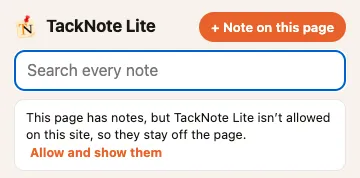
One click brings the notes back. - Pin it to your toolbar. The welcome page now starts by showing how to pin TackNote Lite next to the address bar.
1.0.4
October 9, 2026- A keyboard shortcut on Windows and Linux. Press Alt+Shift+K to tack a note to the page you are on. Chrome keeps Alt+Shift+N for itself on Windows and Linux, so until now TackNote Lite had no shortcut there. On a Mac it is still Option+Shift+N.
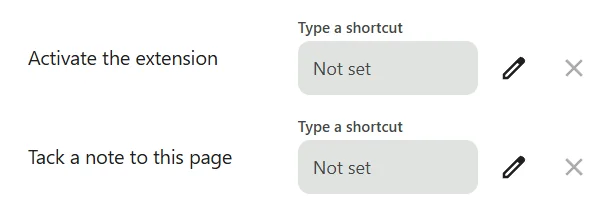
Before: on Windows, Chrome left the shortcut unset. 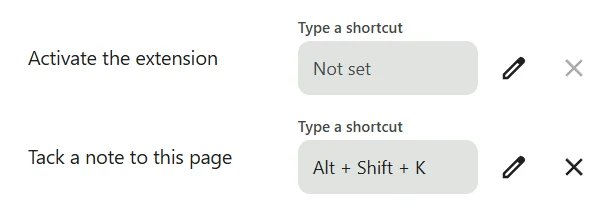
Now: Alt+Shift+K is ready to use. - Clearer help when no shortcut is set. If Chrome has no shortcut for TackNote Lite, for example because another extension uses those keys, the welcome page, the board and the settings start with right-click and say why. A Set a shortcut button takes you straight to Chrome's shortcuts page.
- A clear message on pages Chrome protects. Chrome does not let extensions add notes on the Chrome Web Store, its own pages or the new tab page. On those pages TackNote Lite now tells you so and asks for no permission. Open any website and try again.
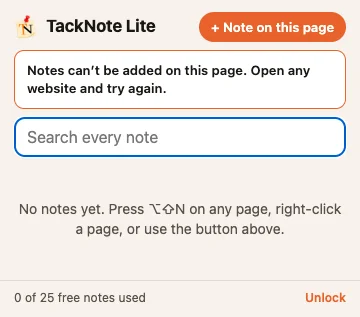
On the Chrome Web Store, the board says why there is no note.
1.0.3
October 8, 2026- TackNote Lite asks before it works on a site. The first time you add a note on a site, Chrome asks to let TackNote Lite work there. Choose Allow, and that site's notes come back on their own every time you return. If you installed an earlier version, your sites stay allowed.
- See and remove the sites you allowed. The settings list every site TackNote Lite works on, and you can remove any of them.
- A welcome page. When you install TackNote Lite, a short page shows how to add your first note.
- Not in Incognito windows. TackNote Lite does not run in Incognito windows.
- Various fixes and improvements.
1.0.2
October 5, 2026- TackNote Lite has its own unlock. Lite is unlocked with a TackNote Lite key, separate from a TackNote for Mac or Windows license. If you already unlocked Lite, it stays unlocked.
- Various fixes and improvements.
1.0.1
October 2026- Every video and product gets its own note. A note keeps the part of the address that names its page, so each YouTube video, product page or post has a note of its own. Tracking tags, searches and sort orders are still ignored.
- See notes waiting in your other tabs. The board lists your other open tabs that have notes, each tagged with how many.
- 25 free notes. Your first 25 notes are free, for as long as you like. Unlock once for unlimited notes.
- Various fixes and improvements.
1.0.0
October 3, 2026- TackNote Lite arrives in the Chrome Web Store. Stick a note to a web page or to a whole site. Leave the page and the note steps aside; come back and it is waiting where you left it.
- A board in your toolbar. Every note in one place, with search. The toolbar icon shows how many notes the page you are on has.
- Colors and checklists. Give any note a color, or turn it into a checklist.